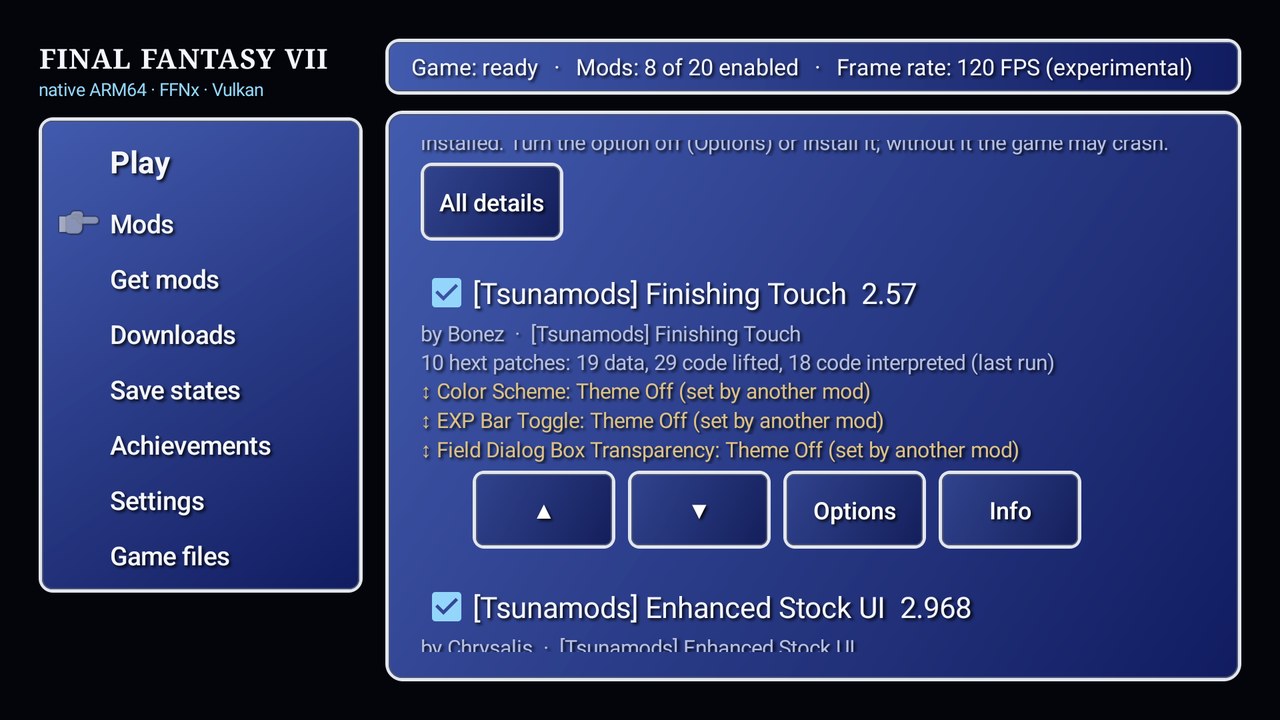
The unofficial Android recompilation of Final Fantasy VII now has a tidier way to manage the mods that help keep the original game fresh. FF7Recomp 1.1.20, released November 17, 2026 at 08:16 UTC, rebuilds the Mods page into a more compact list with clearer controls for enabling, sorting, updating and removing modifications.
The developer's official v1.1.20 patch notes call the new layout similar to FF9Recomp's. The change isn't a major rendering breakthrough, but for a handheld with twenty or more installed mods, the time spent navigating a cluttered settings menu can add up.
One row per mod, with the useful buttons in reach
The old Mods page spread tasks across different places. In 1.1.20, the top of the page contains a short description and a single control strip: Get mods, Add a mod file, Add folder, All on, All off, Auto-sort and Update all when updates exist.
Each installed mod now occupies one row showing its enable state, load-order number, name and a compact description. Actions for Options, Update, Info and Remove are on that same line, alongside arrows for changing load order when relevant.
That is the kind of interface change that doesn't look dramatic in a changelog but can transform how a modded PC game feels on an Android handheld. You should be able to glance at the list, see which modifications are active and take action without opening a separate menu for every entry.
The update does not mean those mods suddenly become compatible with every Android device. FF7Recomp still depends on the formats and runtime behavior its launcher actually supports.
Load order is easier to read and adjust
In a modded game, load order determines which files and changes take precedence when multiple packages affect similar data. In the new interface, enabled mods appear together at the top in the order they load. Disabled entries come afterward rather than interrupting the active chain.
The up and down arrows move an enabled mod past the next enabled entry. That matters when a player is troubleshooting a visual or interface package: the relevant order is the order of active modifications, not the number of things that happen to be installed.
Warnings remain visible beneath the affected mod's row. For deeper investigation, shared-file details are accessible under All details. The interface therefore prioritizes everyday tasks without throwing away the information enthusiasts need to debug collisions.
The maintainer specifically reports testing the list and arrows with twenty mods on an AYN Thor. They moved entries around and confirmed the original load order could be restored, as well as checking the separate enabled and disabled sections. This is a developer test on one device, not independent confirmation that every mod catalog or phone works equally well.
Why this matters for a native Android port
The FF7Recomp README describes a project that statically recompiles a user's PC copy of Final Fantasy VII to ARM64 code running natively on Android, with FFNx providing graphics and a launcher inspired by the 7th Heaven mod ecosystem.
The setup was developed with the dual-screen AYN Thor in mind, though it is intended for other handhelds and phones. Its project screenshots show the game on the upper screen while party details or controls occupy the lower one. There are also touch controls for single-screen devices and display choices such as Vulkan versus OpenGL ES.
This is not a PlayStation emulator and it isn't an official Square Enix port. It uses files supplied from a compatible PC release the player owns. The downloadable APK contains no copyrighted game executable or data, and mods have their own authors and support limits.
The modern interface helps address a particular mismatch: desktop-style modding tools were created with a mouse, keyboard and generous screen space in mind. On a portable system, being able to read and change a mod's order directly in one list is a genuine quality-of-life gain.
What version 1.1.20 does not add
The patch notes do not announce a new engine, a fresh world-map renderer or a universal FPS increase. Earlier releases introduced or refined features such as dual-screen layouts, touch controls, renderer compatibility and other launcher functions. Those are background context, not features introduced by the November 17 Mods-page revision.
The author is unusually open about the development process: the project was built predominantly with AI coding assistance under human testing, and its code hasn't received exhaustive line-by-line expert review. That is relevant to how players should approach a fast-moving experimental port, not a substitute for checking whether a particular bug has been reproduced.
Installing a new APK over an existing version should preserve the setup according to the update instructions, but backing up saves and key mod configurations is still prudent. If mod conflicts persist, switching every modification on at once is not a reliable debugging strategy.
Updating and checking what changed
Existing players can open Settings → Updates in the FF7Recomp launcher or install the v1.1.20 APK over their current installation, then press Play. If prompted to update the game, the launcher handles that as a separate short step. The release page includes an APK SHA-256 checksum and signing-certificate fingerprint so users can check they have the intended package.
Players encountering issues with a mod's files or catalog should use the repository's issue tracker, report their Android device and renderer, and identify the mod involved. A screenshot of the old versus new load order is more useful than saying a mod “stopped working” without context.
With v1.1.20, the developer hasn't fundamentally changed Final Fantasy VII. The gain is simpler control over the collection of modifications players already use: an easier overview, less menu-hopping and clearer load-order tools. For people running a large mod list on an Android handheld, that is exactly the sort of update worth noticing.
Source date: November 17, 2026