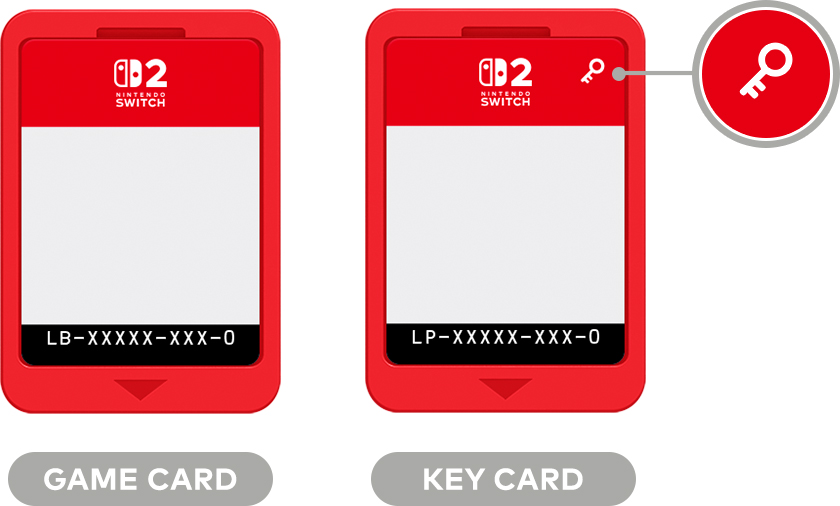
Nintendo Switch 2 game-key cards look like physical games, but the full game isn't on the cartridge. Instead, the card acts as a physical key to download and launch the game. You'll need internet access and enough storage for the first installation, but Nintendo says you can play offline afterward when the card is inserted.
That matters when buying used games, sharing with family or taking your Switch 2 somewhere without reliable Wi-Fi. Game-key cards are neither standard full-game cartridges nor ordinary digital download codes. Here are the practical differences, based on Nintendo's published support information.
What is a Nintendo Switch 2 game-key card?
Nintendo's official game-key card guide explains that Switch 2 has two physical formats: regular game cards, which contain game data, and game-key cards, which don't include the full game. The latter unlock a download to the console's storage.
Look for the key icon on the cartridge and the Game-Key Card label on its box. Packaging also states how much free storage you need. A boxed Switch 2 release isn't automatically a traditional cartridge containing the complete game.
| Feature | Regular game card | Game-key card |
|---|---|---|
| Main game files | Typically on cartridge; updates may download | Downloaded to console |
| Card required to play | Yes | Yes |
| First-time online download | Depends on title | Required |
| Can move between Switch 2 consoles | Yes | Yes, with a fresh download |
| Saves carried on cartridge | No | No |
Some games still require internet for online-only features, regardless of physical format.
Can you play a game-key card offline?
Yes, after the initial download and first launch. Nintendo's support guide states that the internet is required for the first use. After downloading the game, you can launch offline-capable content without staying connected.
You still need the matching game-key card inserted. Downloading the files doesn't change a key card into an account-owned game that can be launched without the physical key. Without the card, you can't use that cartridge licence to play.
Before travelling, fully install the game, open it once while connected and then test with Wi-Fi disabled. Multiplayer servers or other internet-dependent modes may still be unavailable offline, even if the game itself launches.
What happens if you move the card to another console?
Nintendo confirms that the key card works in another Nintendo Switch 2. Its new owner or borrower needs to connect that console to the internet and download the game files locally. The card isn't permanently locked to the first console.
However, moving the card does not move your progress. Save data is stored in the console's internal memory, separately from both the key card and the downloaded software.
Does a game-key card require a Nintendo Account?
No. Nintendo's Switch 2 FAQ says an account isn't required just to download software associated with a game-key card. That's an important distinction from redeeming a one-time digital store code.
A Nintendo Account might still be necessary for online multiplayer, cloud services or other network features, depending on the game. The absence of an account requirement for the basic download doesn't make every feature account-free.
Can you lend, trade or resell game-key cards?
Yes—the card can be used on different Switch 2 consoles. Because access follows the physical card, you can lend or sell it much like a regular game cartridge. The next player needs the actual key card and an initial internet download.
If you sell the card after installing the game, the installation may remain on your console, but you won't be able to launch it using that key without the cartridge.
This is different from Virtual Game Cards, Nintendo's system for managing certain digital purchases and lending them within a Nintendo Account family group. Those are digital entitlements; game-key cards are physical media.
When buying second-hand, confirm the card itself is included, not just the red box or a screenshot of a download. Check that it is recognized by your console before considering the purchase complete.
What storage does a game-key card need?
Since the files aren't on the key card, the full download needs room in Switch 2 internal storage or a compatible microSD Express card. Nintendo says the required capacity is printed on the packaging and can also be checked on the digital game's store listing.
To see available space, visit System Settings → Data Management. Leave additional capacity for updates, which may arrive after the initial download.
A standard microSD card from the first Switch is not interchangeable with microSD Express for Switch 2 game storage. And if you delete a game-key installation, you can't recover those absent files from the card alone: you'll need another download.
How to use a game-key card for the first time
- Check the box for the Game-Key Card label and required download size.
- Make sure your Switch 2 is updated: Nintendo's support overview specifies system version 20.1.1 or later.
- Connect to Wi-Fi and check free storage.
- Insert the card and follow the HOME Menu's download instructions.
- Wait for the installation, then launch the game once while online.
- Keep the card inserted whenever you want to play; test an offline launch if needed.
If the console asks you to download the game again, check whether the installation was deleted or the system was reset. In those situations the key card doesn't replace the missing game data.
Nintendo Switch 2 game-key card FAQ
Is a game-key card a one-use download code?
No. It's a reusable physical launch key, not a single-use code redeemed permanently to a Nintendo Account. The same card can unlock the required download on another Switch 2.
Does it work if Nintendo's download servers eventually close?
Once properly installed, offline-capable content can launch without connecting again. But Nintendo's current instructions don't guarantee that you'll be able to re-download the files after a hypothetical future service shutdown.
Will a used game-key card contain someone else's saves?
No. Save data stays in console memory and is not carried by the cartridge.
Is a game-key card the same as a Virtual Game Card?
No. A game-key card is physical, while Virtual Game Cards are a separate feature for digital games managed through Nintendo's account system.
The bottom line
A Switch 2 game-key card is physical access to a downloaded game, not a cartridge containing the complete software. You can share or resell the card and play offline after installation, but it must remain inserted whenever you launch the game.
For an informed purchase, check two things on the box: the key icon and the required download size. Those tell you whether the game depends on a first-time internet connection and significant console storage.
Official sources: Nintendo's Game-Key Cards guide, Nintendo customer support and Nintendo's Switch 2 FAQ. These describe Nintendo's current published guidance, not a new policy announced today.
Source date: April 2, 2025