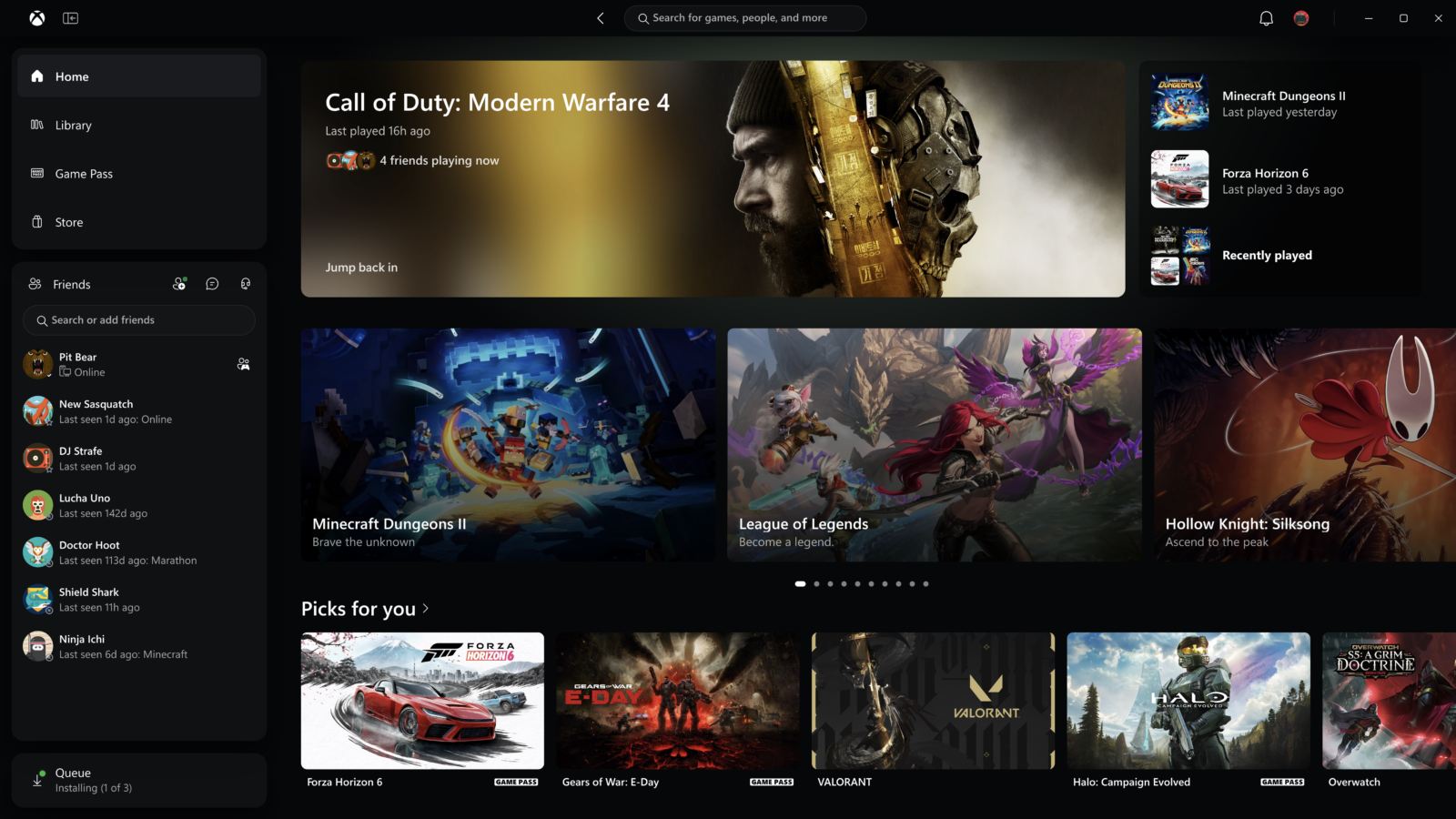
The Xbox app on Windows is getting a much-needed speed boost—but no, Microsoft is not promising 60% more frames per second in your games. Asha Sharma, Microsoft's Xbox chief, highlighted a new PC app update on November 5, 2026, saying that it can launch up to 60% faster. The larger announcement reveals a redesigned library, more visible friends and changes to Xbox Cloud Gaming across the web, TVs and VR headsets.
The important catch: the faster Windows app starts rolling out to Xbox Insiders first, so not every PC player should expect to see the redesign today. The numbers are Microsoft's own measurements and can vary with the computer and connection. Here is what actually changes, why it matters to Game Pass players and what that headline percentage does not mean.
The details come from Microsoft's November 5 Xbox Wire announcement, not a speculative leak. Sharma also highlighted the rollout on X.
What does '60 percent faster' actually mean?
Microsoft reports three different maximum improvements for the new Xbox Windows application:
| Part of the experience | Microsoft's reported improvement |
|---|---|
| Launching the Xbox PC app | Up to 60% faster |
| Loading Home, Store and Game Pass pages | Up to 50% faster |
| Opening windows inside the app | Up to 65% faster |
Those are not interchangeable statistics. An app that starts faster has not necessarily improved the performance of a game that it launches. Likewise, the company has not said that downloading a title is 60% faster, that cloud streaming latency has dropped by that amount, or that every Windows PC will achieve the same result.
Xbox Wire explicitly notes that its performance data comes from Microsoft's testing and may change with device specifications, system configuration, network conditions and usage. The announcement provides these top-line improvements, but not a universal benchmark for every machine or game.
That distinction matters to players looking for FPS fixes. If Forza, Call of Duty or another game runs poorly, you should not treat this Xbox app release as a graphics-driver optimization. The measurable promise here is less waiting before you start playing.
A redesigned library that makes it easier to find games
Speed isn't the whole update. Microsoft says the PC app also gets simplified library navigation, refreshed filtering options and more ways to arrange a personal collection.
For regular Game Pass subscribers, a better library has practical value. When you're switching between downloaded games, subscription titles and installed add-ons, the difficult part is often knowing where the next title lives. The new layout is designed to reduce that friction.
The update also moves friends and social features into the main navigation. Microsoft says players will be able to check what friends are playing and more easily start a chat or join a party. Search reaches across more Xbox content, including games, installed titles, add-ons and people.
Other visible changes include refreshed game cards, a cleaner Home screen, updated settings and revised animations. The official Xbox Wire screenshots show the new interface and are far more useful evidence of the redesign than an unrelated Xbox logo.
Xbox Cloud Gaming is also changing
The November 5 announcement isn't limited to installing and launching games on a Windows PC. A separate refreshed Xbox Cloud Gaming web experience is expanding from its earlier Insider preview to more players over the coming weeks.
A new Library tab gathers cloud-playable games together, whether they are owned outright or accessed through Game Pass. Users can sort and filter their collection using properties such as genre, recently played games and input options.
On larger screens, a desktop mode is designed to use available space more effectively. Microsoft is also offering a light theme alongside dark mode, plus five additional high-contrast options for players who need clearer visual separation.
If you want to check the refreshed cloud interface before it reaches your account automatically, Microsoft directs players to play.xbox.com. Exact access and supported catalog options still depend on account, region and service eligibility.
The look and navigation are also beginning to reach supported smart TVs and VR headsets. This is a staged rollout, not a claim that every television or headset gets the same interface today.
When will the faster Xbox app reach your PC?
Microsoft says Xbox Insiders can start trying the updated PC app from November 5. The general-availability date for all Windows players was not specified in the announcement.
If you are not yet in the program, Microsoft's official guide explains how to join using the Xbox Insider Hub for Windows. Participation and available previews may differ by region and account, and Insider software may change as Microsoft collects feedback.
If you're already enrolled, watch the Xbox app and Insider announcements for your particular rollout. Avoid assuming something is broken just because a friend has the new interface before you do.
You also don't need to join Insider builds to understand the announcement: the official images and feature descriptions show exactly what Microsoft is planning. If you value stability over early access, it is reasonable to stay on the standard release and await further details.
How this differs from Xbox Mode on Windows 11
Microsoft has been working on a more console-like Windows gaming experience throughout 2026. Earlier this year it began rolling out Xbox Mode on Windows 11 PCs, a controller-focused, full-screen way to browse and launch games.
The November update is related to that broader PC strategy, but it is not the same announcement. It targets the everyday Xbox PC app's responsiveness, menus, library and social experience, plus the cloud interface across additional screens.
For handheld PC owners, faster access to games and a more navigable library can matter as much as the app's appearance, particularly when using a controller rather than a mouse. That is the practical appeal of these changes—not a promise of instant new hardware-level performance.
What players should take away
There are three useful conclusions. First, Xbox Insiders are the initial audience for the Windows app update. Second, the largest percentage measures launch speed, with separate claimed improvements for pages and in-app windows. Third, the cloud and TV changes follow a different timetable and should not be confused with the local PC rollout.
Microsoft's announcement focuses on the minutes and clicks surrounding a game session: opening the app, locating the right title, finding friends and getting into play. Those frustrations are real, even if they do not show up in a frame-rate graph.
The company has provided promising figures, but GameLogNews has not independently benchmarked the new build. The test will be whether the changes feel faster and more predictable across the different Windows systems and devices players actually use.
A faster route to your games is welcome. Just don't mistake it for 60% faster games.
Source date: November 5, 2026