The Asus TUF Gaming A14 Crushes Benchmarks but Stumbles Where It Matters Most
14-inch gaming laptops used to be a compromise between melting your lap and playing a glorified slideshow. The Asus TUF Gaming A14 attempts to break that cycle with a spec sheet that looks like a dream, but the actual benchmarks tell a much more complicated story for enthusiasts. What this means for players: You are getting incredible raw processing power for productivity, but high-end ray tracing remains a bridge too far for this specific silicon configuration.
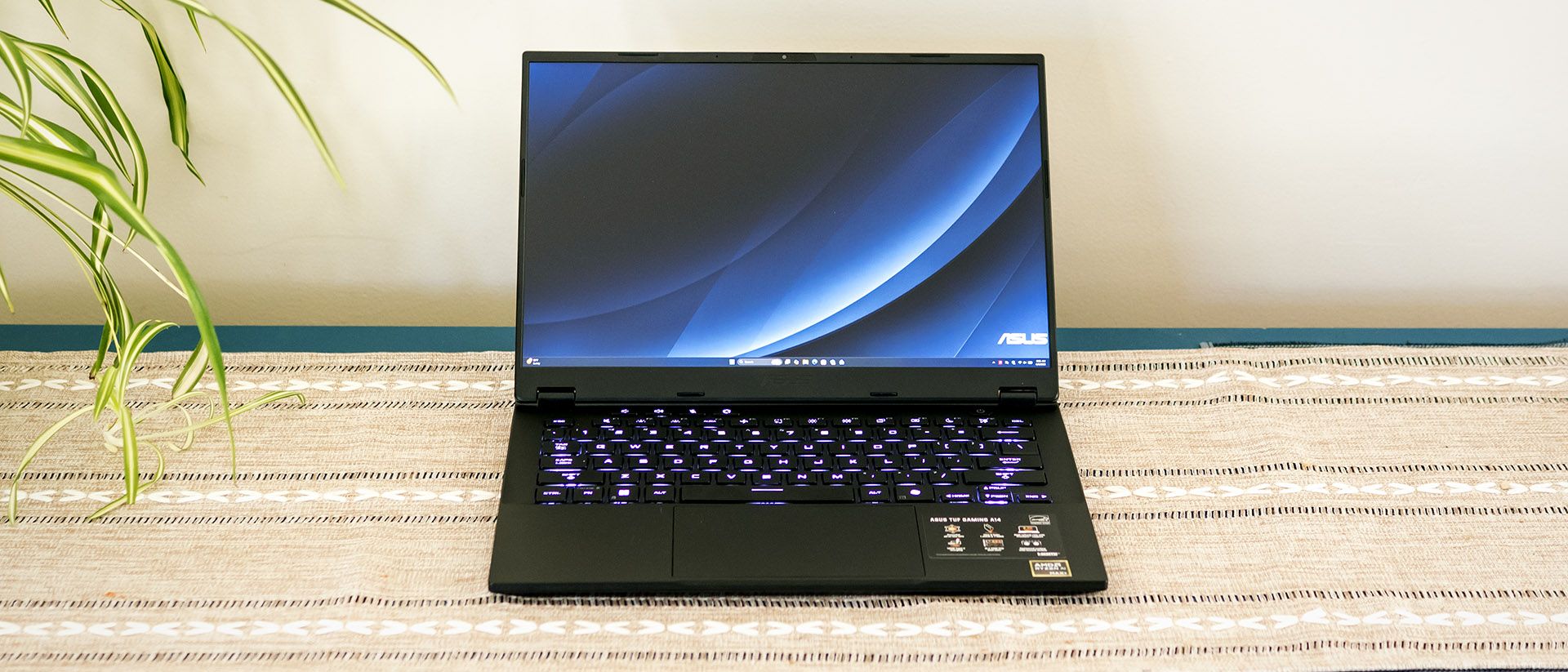

Asus TUF Gaming A14 Performance Reality Check
Under the hood, the Asus TUF Gaming A14 packs the AMD Ryzen AI Max+ 392 CPU, a chip designed to handle heavy multi-threaded workloads without breaking a sweat. In synthetic testing, the results are nothing short of impressive. Geekbench 6 scores clocked in at 2,867 for single-core performance and a massive 17,334 for multi-core performance. For a chassis this small, those numbers suggest a level of silicon efficiency that was unthinkable two years ago.
This laptop is clearly aimed at the power user who needs to render video or compile code between gaming sessions. The multi-core score, in particular, places it in direct competition with much larger, heavier machines. However, raw CPU power is only half the battle in a gaming rig. The thermal management required to keep the Ryzen AI Max+ 392 from throttling in a 14-inch frame is a feat of engineering, yet it sets high expectations for the graphical side of the equation that the hardware struggles to maintain.
The architecture here favors sustained throughput, which is evident in the data transfer speeds. During a 25GB file transfer test, the system maintained an average speed of 1,520.83 MBps. This ensures that game load times and large asset transfers remain snappy, preventing the storage bottleneck that often plagues mid-range gaming laptops. It is a technical powerhouse on paper, but the transition from synthetic benchmarks to real-world gaming reveals the limits of its portable design.
AMD Radeon 8060S Graphics Hit a Wall
When it comes to actual frame rates, the AMD Radeon 8060S graphics chip provides a respectable experience in optimized titles, but it lacks the headroom for the industry’s most demanding settings. In Shadow of the Tomb Raider at 1080p, the TUF Gaming A14 managed a smooth 67 FPS. Far Cry 6 followed suit with a consistent 66 FPS, proving that for the majority of modern AAA titles, this machine delivers a solid "console-plus" experience. Even the notoriously heavy Red Dead Redemption 2 stayed playable, averaging 49 FPS.
The narrative shifts dramatically when you introduce advanced lighting techniques. In Cyberpunk 2077 using the Ray Tracing Ultra preset at 1080p, the performance tanked to a mere 16 FPS. This is a clear indicator that while the Radeon 8060S is capable of traditional rasterization, it lacks the dedicated hardware or thermal headroom to handle heavy ray tracing workloads. For players who value visual fidelity and lighting accuracy above all else, this creates a significant performance gap that cannot be ignored.
This discrepancy highlights the current state of 14-inch gaming hardware. You can have high frame rates in standard titles or beautiful lighting in screenshots, but rarely both at the same time in this form factor. Enthusiasts will need to decide if the trade-off is worth the portability. The TUF Gaming A14 is a workhorse for the average gamer, but it is not the "RTX-killer" that some might have hoped for given its high-end CPU pairing.
The Asus TUF Gaming A14 Display Specs
The visual experience is anchored by a 14-inch display that punches above its weight class in terms of clarity. With a resolution of 2560 x 1600, the pixel density is sharp enough to make text look printed and textures pop. The 165 Hz refresh rate ensures that in those titles where the Radeon 8060S can push high frames, like competitive shooters or older RPGs, the motion remains fluid and tear-free. It is a panel built for speed, even if the GPU can't always keep up with the native resolution in every game.
Brightness is another strong suit, with the panel hitting a peak of 390 nits. While not quite reaching the heights of some premium OLED panels, it is more than enough for indoor gaming and well-lit office environments. The 16:10 aspect ratio provides extra vertical real estate, which is a godsend for productivity tasks and web browsing. It makes the 14-inch screen feel larger than it actually is, though the thin bezels contribute to a footprint that fits easily into a standard backpack.
However, not every component on the front of the device shares this level of quality. The integrated webcam is a notable weak point. Despite featuring a 1920 x 1080 sensor, the actual image quality was described as disappointing. In an era where remote work and streaming are standard, the grainy output feels like a missed opportunity for a laptop that otherwise positions itself as a premium "do-it-all" machine. It is a reminder that even in a high-performance rig, manufacturers often find small places to cut costs.
Internal Storage and Ryzen AI Max+ Power
One of the most surprising aspects of the Asus TUF Gaming A14 is its commitment to longevity and upgradeability. Most 14-inch laptops solder as many components as possible to save space, but Asus included two M.2 2280 drive slots. This allows users to expand their storage easily as game libraries grow, a rare feature in this size category. Being able to add a secondary 2TB or 4TB drive without replacing the primary boot drive is a massive win for long-term value.
Battery life is another area where the TUF Gaming A14 defies the "gaming laptop" stereotype. In testing, the machine maintained a battery life of 9 hours and 7 minutes. This longevity is largely thanks to the efficiency of the Ryzen AI Max+ architecture, which can scale down power consumption significantly when not under a full gaming load. You could reasonably take this to a coffee shop or a full day of classes without hunting for a power outlet, provided you aren't trying to run Cyberpunk on the train.
Connectivity is a bit of a mixed bag. The laptop supports Wi-Fi 6E via a Realtek 8852CE card, providing access to the 6GHz band for lower latency in crowded areas. However, it lacks support for the newer Wi-Fi 7 standard. While Wi-Fi 7 is still in its early stages of adoption, its absence here might frustrate those looking to future-proof their setup for the next five years. Despite this, the overall package remains a compelling choice for those who need a balance of endurance and raw multi-core power in a compact frame.
Expect Asus to iterate on this thermal envelope in the next generation to better support the high-end Ryzen AI architecture. Future firmware updates may stabilize the Radeon 8060S performance in ray-traced environments, though hardware limits will persist. The 14-inch form factor is clearly the new battleground for efficiency-first mobile gaming.
Frequently Asked Questions
Does the Asus TUF Gaming A14 support Wi-Fi 7?
No, the laptop is equipped with a Realtek 8852CE card which supports Wi-Fi 6E but does not include the newer Wi-Fi 7 standard.
Can you upgrade the internal storage of this laptop?
Yes, the TUF Gaming A14 features two M.2 2280 drive slots, allowing for easy storage expansion or secondary drive installation.
How long does the battery last during normal use?
Testing shows the laptop can maintain a battery life of approximately 9 hours and 7 minutes, making it highly portable for non-gaming tasks.
Tags : #AsusTUF #GamingLaptop #A14Review #GamingSpecs #LaptopPerformance
Confirmed details first, useful context second. This is the quickest path to the source trail and the next pages worth opening.
Source date: April 16, 2026